
Another way to make money: How businesses can launch a MiniApp inside Click
Click's MiniApp is another way to market and grow your business. Click explained how this format differs from a website and mobile app, what tasks it's suitable for, and how to launch it.
Here's a rewritten version of the news story in Russian:
**New Sales Channel: How Businesses Can Integrate MiniApp into Click**
For modern businesses, it's critical not only to identify new growth opportunities but also to expand their sales tools, including online ordering, payment acceptance, and delivery. However, creating a website or mobile app often entails significant time, financial, and resource investments.
MiniApp offers an additional sales channel—a digital service integrated into Click SuperApp. It allows users to select products or services, place orders, and pay directly within the app.
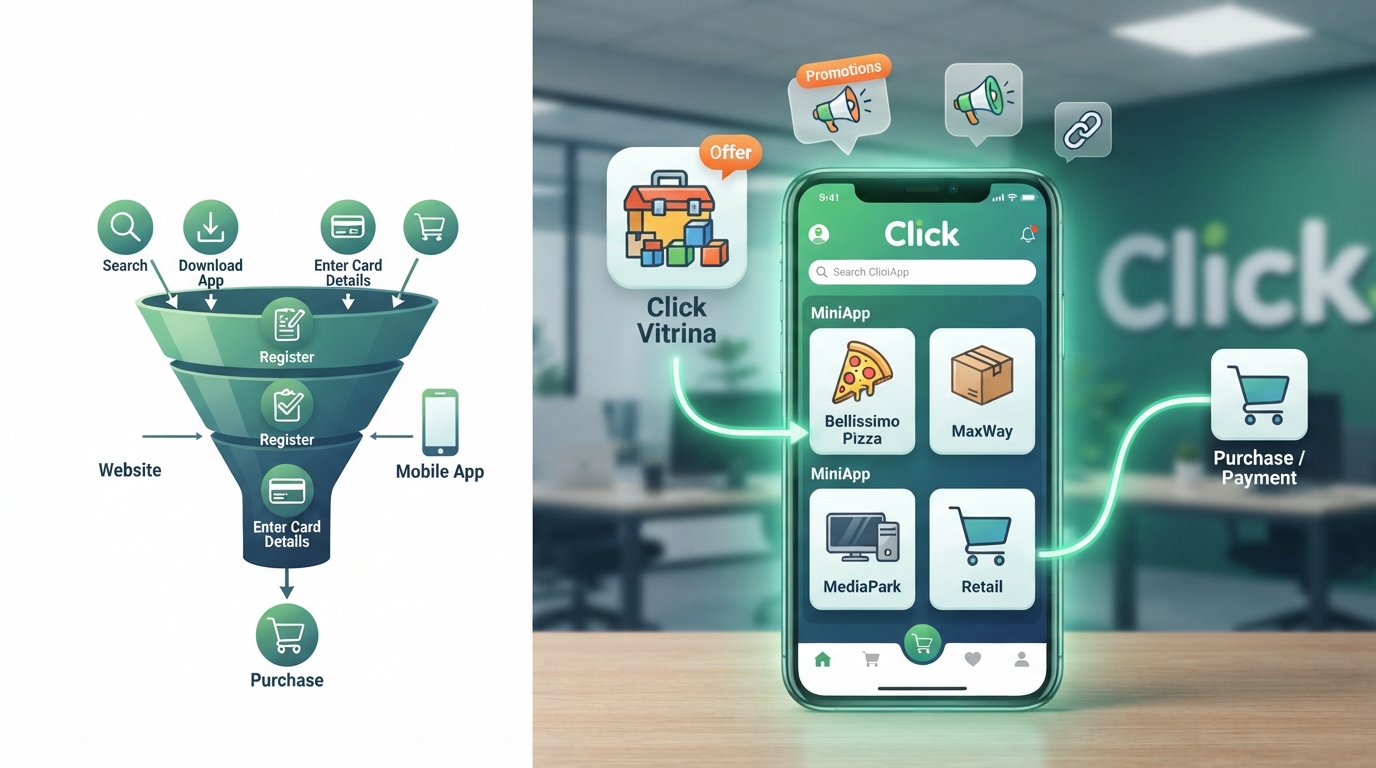
MiniApp functions directly within Click SuperApp. Users don't need to search for it separately, download it, or log in each time. The service opens instantly within Click, allowing them to select a product, place an order, and proceed to payment.
MiniApp significantly shortens the user's path to purchase. There's no need to download the service separately, re-register, or enter bank card information. All the necessary information is already available in Click, minimizing the number of steps from selecting a product or service to completing payment. Reducing the number of steps, in turn, helps increase conversion.
The website, mobile app, and MiniApp all share the same goal: helping users learn about the product, place an order, and pay for it. The main difference lies in the method of accessing the service and the number of steps required to complete the purchase.
**Comparison of MiniApp, Website, and Mobile App**
| What are we comparing | MiniApp | Website | Mobile App |
|---|---|---|---|
| **How the user opens the service** | Within Click SuperApp or via a direct link | Opens the browser via a link, search, or ad | Downloads from the App Store or Google Play |
| **What to do before purchasing** | Open MiniApp and select an offer | Go to the website, log in if necessary, and select a payment method | Install the app, open it, and register if necessary |
| **Where the payment takes place** | Directly within Click SuperApp | Through a website-connected payment system | Through the app's payment system |
| **What you need to launch** | Connect a website or web app to Click or build a service in Click Vitrina | Develop a website, enable payment processing, and publish it online | Develop an app, publish it in app stores, and release updates |
MiniApp doesn't replace an existing website or mobile app; it complements them, providing businesses with another effective tool for engaging with Click's audience.
The MiniApp launch process consists of five steps: from submitting an application and adding the project to the platform to verification, enabling payments, and publishing it in Click SuperApp.
If a company doesn't have a ready-made website or web app, they can create a MiniApp using the free Click Vitrina builder. It includes ready-made modules for a catalog or menu, order placement and payment, and tools for managing order statuses. The ready-made service can be integrated with Click, and for more specific needs not covered by Vitrina, a custom MiniApp can be developed.
The Click MiniApps platform generates a direct promotional link to the MiniApp. It can be distributed on social media, Telegram channels, or on your own website, directing users to the service. Promotion terms within Click SuperApp are discussed separately.
Click already successfully supports services from companies such as Bellissimo Pizza, MaxWay, MediaPark, ioka, FlyEsim, Ishli, and dozens of others. For example, over 300,000 people used the Oygul service in the first three months after its launch. For MaxWay and Bellissimo Pizza, collaboration on the MiniApp format resulted in a 4.6-fold and 10-fold increase in orders, respectively.
From July 3rd until the end of 2026, Click is running the "Launch a MiniApp with 0% Commission" promotion. Legal entities and sole proprietors registered in Uzbekistan are eligible to participate. To participate, submit an application, pass verification, and launch a MiniApp in Click SuperApp during the promotional period.
The grace period begins on the MiniApp launch date: during the first three calendar months, the Click commission will be 0% for monthly turnover up to 100 million soums. For turnover exceeding this amount, the commission as specified in the agreement will apply. After the grace period, the standard commission as specified in the agreement will apply to all MiniApp turnover. You can apply and view the full terms of the promotion by following this link.
Advertising rights.